Articles by "How-To-Do"
Showing posts with label How-To-Do. Show all posts
A blog is all about blogging, computer tricks, latest News, upcoming games and Reviews
5 hack of tension free life | Become Tech
5 hack of tension free life

If you have been living life with a constant feel of pressure and stress, then it is the time you took a step back and started reconsidering things. There is much on everyone’s plate and trying to keep everyone happy and juggle everything at the same time is not possible. But what is definitely doable is to keep yourself happy through some simple life hacks that will enable you to eliminate stress. It is obviously harder done than said, but there is no harm in trying something that can have a positive impact on your life. So if you are eager to enjoy the hot brewing cup of coffee on a Sunday morning without having to think of how to go on with the presentation at work tomorrow or how to start off the confrontation with an unpleasant so-called relative; then you could follow a few easy steps that will surely ensure an anxiety free life.

A stress-free journey

If you are at a low point then try considering a few issues due to which you face most problems and eliminate it from the source by helping yourself.
  • Identify a source of the stress – Sometimes it so happens that we are tense throughout the day without even realising what we are upset about. So the first trick is to go through relevant events and source out the reason for your apprehension. This helps a lot in understanding why you are down and also aids in finding out an appropriate solution.
  • Tend to priorities only – Considering that there are too many people that we have to focus on every day, sometimes it can get very overwhelming to give time to everything and everyone. So once in a while if you just focus on the things you want to do and not on those that you have to do, then life becomes a lot simpler and easier to manage.
  • Turn a deaf ear to what others say – It is necessary that you stop listening to what every other person has to comment on you and your life choices. Only pay attention to advice coming from those who care for you and love you. Stop judging yourself on opinions of people who hardly matter.
  • Seek help – If you have close friends and family members, then spend time with them and ask for support when you need the most. People who care for you will always be eager to support you anytime you require. So do not be shy. Understand your weakness and your close ones will turn them into your strength.
  • Mediate – Darken the room, light a candle, sit on the floor and close your eyes. Don’t think of anything and try to keep a clear mind. Meditation is the best medium that you can adopt in order to calm down, relieve the stress and concentrate better. This will not only help you to find inner peace but also certify that you deal with tension without ripping your head apart. 

Find mental peace

Following a few simple daily rules as such and incorporating, these elements in your life are bound to have a positive effect. You need to implement these steps in your life so that when you are suffering and are down, a friendly chat with your loved one or a peaceful mediation will be able to give you the much need energy to continue down the road of life. Make yourself feel important and things will automatically fall into place.

Read more things at LIC Merchant

Thanks.
A blog is all about blogging, computer tricks, latest News, upcoming games and Reviews
Upgrade Your Windows

Hy Guys! Today i come with a most important topics that are very commons now a days, the topic is about to How to Install or upgrade a windows 10 on Desktop PC. Many people faces a lot of trouble of having an windows 10 upgrade in thier PC's. So By reading this you have nothing to go anywhere or not more do any searches related this topic on Google now on. So this is very right and straight forward process to having an upgrade but guide should be compulsory for this.

Now you have a question why we upgrade our windows, so ask yourself if you have a PS2, and you play, play ad play over the years on it, and new games are coming out that will not support the console version u have so u have to upgrade it PS3 or PS4... SIMILARLY, this thing happened with windows to use it like more efficiently and make more ease-to-use. 

We all know upgrading the windows is simple process and everything runs smoothly... we have seen before and know how microsoft upgradion process works... but there are somethings and some important choices that u have to make it for the clean installment of the new version. So this time Microsoft makes something change and makes it a little difficult for the PC users to Upgrade. So there are some important guidelines that they make to know you. So lets begin the upgradation process.....

What U Have or Need to Know before upgrade:

You must have a these windows version in your pc before upgrade are as follows:

1. Windows 7 ( Versions won't matter like Ultimate, Professionals, etc ) 
2. Windows 8 ( Versions won't matter like PRO or something else )

An ACTIVATED VERSION OF WINDOWS:

So now this is the most important part that you need to know before an update if you skip this step you will not be able to install a newer version on your computer. You must have a fully activated version of Windows you are using, and your computer screen should not be see's like this as shown in the figure.

If you want to check that your windows are activated or not then you just Right Click on My Computer icon and then click on Properties. Then there is dialog box appear which shows you your PC specs then at the end column there is a column of windows activation and then below there is Windows activation status that shows you that your windows are activated or not.
Hope you understand it.
Now before an upgrade, it's a good idea to run Windows upgrade assistant to see whether your hardware is adequate to run a newer version of windows or not. It also checks which of your application program is compatible with this version. You can find this tool here 
Note: If your computer can handle Windows 8 then it should be handle Windows 10 with ease.

Upgrade Starts:

Now after doing all of the above steps right you are ready to go

there are basically two installation steps for windows 10

1. By using Media Creation Tool ( This process is automatic )

2. Or by manually upgrade  by getting windows Upgrade notification.

In the first step the Media creation tool would automatically checks your system status to see whether your PC can handle it or not ( as i said above). This process is fully automatic you need to do nothing during the upgrade just sit back and Relax!!!

Running The Upgrade Installer Tool:  

When you opens the installer, it will looks like this...


Select 'Upgrade This PC Now' option and then click on Next to proceed. The whole process of downloading and installation of windows is depend upon your Internet connection speed, when the downloading is completed, then after it says you to accept the license terms and after accept it you will proceed to the installation process. By default the installer show you the option of what to keep and it's shows you the three option... first says Keep Personal Files & apps, second option says Keep Personal files only and the Third says Nothing.


When you select the first option it will keep all of your apps and documents and settings you saved in the computer or if you select the second option it will delete your saved settings and keep the personal documents files on the computer and if u select the third one it will completely delete all of the personal files and apps present on your computer system.


Now it's time to check that all of your apps and files documents are survived the update process, you can also check that all of the hardware are installed properly or not and check all of the peripherals devices to see they are correctly configured or not, and then enjoying windows 10!!

2ND Way To Do It ??

When you get notified by Microsoft that your system is ready to get the update of windows 10 then in this case all of the installation are straight forward and easy to do.

Now u have to disable your antivirus programs or security system and disconnect all of your peripherals devices such as mouse, keyboard, etc. Sometimes it's found that some of the antivirus, programs and devices connected to your computer may causes hurdles while you download windows 10 on your PC.

You also make sure that you have at approximately 16 GB for 32 Bit Version of windows and 20 GB for 64 Bit Version of windows of free space in your Drive: C.

Once Windows 10 is available to you, a notification on your desktop will appear. Just accept the Important Legal Stuff, and then the Windows setup wizard Your upgrade is ready to install will pop up. You can schedule a time to upgrade, or you can click Start the upgrade now to begin the process.

Now Sit Back and Relax! The update process of windows 7 to 10 will take some of time and make sure you have at least one hour of spare time for this work and make the power will not be turned off during this process, but yeah, during installation your PC will be restarted multiple of time. So don't worry about it.

Once windows 10 will completely installed then they will show you some of the setting and choose your desired one and let's done... Enjoy windows 10

  • Yes, your files and programs will be kept after the upgrade, but there are some settings as i said above.. you can choose multiple option
  • You won't be prompted to enter a product key during the upgrade of Windows 7 or Windows 8 to Windows 10
  • Make sure to re-enable or re-install your antivirus software and other software if you need it 
  • Make sure to go to the Settings app, Update & security, and check for new Windows and driver updates and frequenly installed them because without them your windows is garbage.
  • Open the Windows Device Manager and make sure all the drivers are working correctly. If you don't see a yellow exclamation mark or anything on red, you should be fine.
  • If you're upgrading Windows 7 Starter, Windows 7 Home, or Windows 7 Home Premium, you'll be upgraded to Windows 10 Home. If you're upgrading Windows 7 Professional or Windows 7 Ultimate, you'll be upgraded to Windows 10 Pro
  • Windows 10 Home won't be able to opt out from automatic updates
  • Windows 10 Pro will be able to choose how to receive new Windows Updates
  • You'll need to switch to a Microsoft Account if you want to take advantage of installing Windows Store apps, Cortana, and various other features
  • Last but not lease - Frequently check your windows update and if there is any new version available then update it and enjoy the latest version of Windows  

Summed Up:

I hope this post has released your headache!! If you have any question then please feel free ask in the comment section below. Share this article if you enjoyed it. Thanks

A blog is all about blogging, computer tricks, latest News, upcoming games and Reviews
How To Drive 100,000 Reader's Daily On Your SiteFrom 0 to 100,000 blog reader's a day ? If u having a problem regarding driving traffic then u are at a good place, in this tutorial we show you how to drive targeted traffic to your blogger/websites.

Getting million's of traffic per/day in his website is everyone's dreams. Getting millions of traffic on the blog that's not the easy thing to do. But you do hard work to make 1000 $ per/month. There are a lot of difficulties newbies that how they generated the massive amount of traffic on their blogger blog. There are lot's of the method to get thousands of traffic sometimes u pay for it, sometimes website exchanger helps you to generate massive traffic, but remember do not use Traffic Exchanger or Auto Surf because they provide the fake visitor's not real. If u still use this method there is a chance that may be you blocked by the Google. Here we show how to get massive and targeted traffic for free. By use some tools.

In this tutorial include the following topics:

  • What Is Traffic ?
  • Actionable idea's for driving traffic
  • Content
  • Keyword Research
  • SEO ( Search Engine Optimization )
Before go into the deep make sure that you created a new website and has 0 visits. This article contains the 6 plans that how you get from 0 to 100,000 per day. Yes, 100,000 blog reader's is not impossible, people may use ways to get these visitor's per day.

What IS Traffic ?

It is most important thing to know that what is website traffic and how it works ? In a website, Traffic means the amount of visitor's u get. Means the visits you get daily by the visitors. Traffic is most important thing for your blog if u have 0 traffic then your Alexa rank never gives up and u no more be able to make money by using your blog/website.

There are some great ways where you develop your site visitor's to see your site, which we later discussed. SEO, Backlinking, Keyword researches, all the types of works is to deliver u the organic and healthy visitors. You also need to write killer and optimized content to grab the attention larger amount of a large amount of visitor's. Your site is nothing without visitors.

You can also earn visitor's by Backlinking is the great way to earn hundreds of free traffic a day without type any post. But there are some requirements before you made your website backlinks. If u think that is there a way that my website grow unlimited traffic ? Yes why not but in this case you need to build the SEO of your site. But remember never ever used duplicate traffic means there are lot of websites you found on internet named traffic exchanger or Auto surfer. There are thousands of available like this.

Yes they help to built the traffic and visitor's for your blog for free. But if u use blog the google can't accept these policies. They simply blocked your blogger blog. You see that your site views grow now by using these terms but google Analytics can't count these pageviews. If u think that you want to buy traffic from Alexa or some other site, this trick always helps u.

But it also have a problem they only provide visitor's it does not make your site SEO, backlinks, keywords, etc. So get more traffic for blog is the way to you make the SEO of your site. This is best thing you can do for building massive traffic for your blog. But it takes some time to do that.

Actionable Idea's For Drive Traffic

There are some actionable idea's or tricks that help you to get unique visitors from anything. This section is totally based on ways or actionable idea's that make your site popular. So let's see that is easy and most popular tricks to find a percent of unique visitor's.

Start A Forum On Your Site

I know that many of them never heard a term forum, forum means where the group of people is joined to talk about a particular topic. You can see my website Forum Here. You can create your own web forum on many sites but I preferred groups.google.com. This site gives the complete overview of your forums.

Focus On Keywords
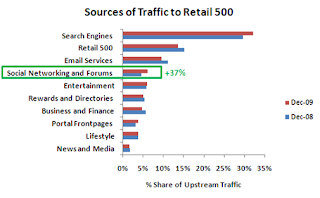
http://becometech.blogspot.com/2015/06/how-to-drive-100000-readers-daily-on.htmlKeywords are the main thing which you definitely focus on that. Many of the newbies didn't give much importance to a keyword. Keywords are the thing which boosts your Page Rank and it is a great source which makes the SEO.


Start Your Facebook Page or Group Today
Start Facebook group or Facebook page that will help you to build more traffic. You use social media like first you make the Facebook page related to your site then invite the friends to like your page. And always updated your page daily by posting the link to your websites post. You can also make a group on Facebook and talk about your websites about your group members.

Submit Your Blog Post To
This is the method which you submit your blog post to Digg and StumbleUpon. This trick also helps you to drive traffic to other websites. That's why we said that socialism is the great way to earn lot's of a reader's on their blog/websites.

Write Good Post Titles
Write good post title means that you are writing a website post about traffic sources that how to get free traffic on their blog, and give the title it to grow your website traffic in just 30 minute's, headline of a post is most important because people see your website post by seeing the title and headlines.

Get On YouTube

YouTube is the great way to earn thousands of visitor's visit's your site. You make short videos about your site and published it on YouTubeHere

Write Guest Post On Other Blog
Write guest post on a relevant blog is the great source of earn traffic. If u write a guest post for other blogs then u must type your blog URL and signature at the end of the post. People who inspired by your guest post must visit your site.

Join a Blogger Community Like ProBlogger and CopyBlogger.

Write Your Own E-books
By writing E-books and add the cover on the side bar of your blog/website is a way to get your visitor's inspired by your site.

Include Related Post Link's At The Middle And End OF The Post
This trick will be helpful to your visitor's, this trick also keeps the visitor longer time on your site. By using this you will also build the SEO of your site.

Here are the top 10 actionable ideas that help you to improve the traffic of your blog, it not only improves the traffic but it also builds the SEO of your site.
If you found this trick is helpful to you then let me know in the comments.

Content

ContentThe name content is more than just a simple word. This is used in various fields like it amazingly boost the Alexa traffic and search engine ranking, and SEO that's why it is so called Content Is King. You often type a post Content is not like a Robotic be calm and write a way that you are talking with your friends. Your content must be highly optimized means "we discuss it later." Normally you choose keywords to write your blog post on a specific topic. If u want to write a long blog post containing 2000 or 2500 words then it needs some times, in this post you do special, like u wrote Killer Content means " A solid Information About Anything ". As u know there is over 2 million blog post published per/day. Some wrote genuine content or some use copyright method. Remember never ever used copyright method, because the google can't accept your article and never indexed it.

You must type content that is related to your keywords, never do that you are writing a content about SEO management and your keywords and description about football tutorials and skills, never do that silly thing because the visitor's who read your blog post is getting confused and leave your articles and make other searches. You only need to catch the visitor's attention on your content. The second thing is to do that give a nice and interesting title to your post as I listed above. Give nice headlines means that your post is about basketball training and you give the title 10 ways to improve to basketball skills. The people which are interested in that always open the post and read it. Some people do that they write content for 4 ways to make money and they give the title like Earn money by blogging , never do that because you may decrease your traffic time by time.

Your typed content must be easier for a reader to read it. Never use hard language that other people can't get it. Make the article beautiful by inserting in images, useful guidelines, videos, etc. Yo think that you go other websites to find your own problems you visit that site and start read the post, the post you are seeing is not in good mannered and author writes the post never uses punctuation, capital or small words and no images and helpful videos are there, you did not want to read it at all. That's why you use the easy way to write content.

Your content length must depend on your category which category you write today. If a category is about tutorials then it would be just 250 or 500 words. But if you have a category like u give the complete guide that how to do this an this then you should write 1500 words to 2000. But in this way you give quality and unique information. Content must be like that they solve your visitor's problem. If visitors comes to your site they must have the specific work that why they are browsing your site. They don't browse your site anonymously. You have two things in your mind if u want your blog post successful the things are - Usefulness - Uniqueness            

Keyword Research

Keyword researches are most important part of SEO that builds the SEO of your site and indexed higher in google and boost your Alexa ranking. If u want to improve the search presence of your site with google. There are some special tools for build and choose the keywords of your blog/website. The things know before choose a right keyword for your blog, " For Example if your blog is about healthy body and fitness then your keywords should relate to health and body fitness. never choose the keyword that not related to your blog. There are some ways where you choose right keywords for your site:
The best and effective way to start your keyword research is to use Google AdWords Tools, this gives the authentic result that you need to find your keywords. They not only tells you a keywords that suitable to your site, but it also gives you a perfect volume of this keyword searches." It also tells you a keyword density, remember when you choose a keyword and write post about it, always check the density of your keyword, if your keyword density is higher then you should find your site in top Google ranking, and when your density is lower then you find your site on 6 to 7 page of google, where no one likes to go" So I prefer that u get to start by Google AdWords to find best keywords for you.

SEO ( Search Engine Optimization )

SEO!! ( Search Engine Optimization ) is a way or strategy or techniques to earn thousands of visitor's per month and to indexed your site higher in Google. SEO is not a term that you learn but it is the technique that how you indexed or boost up your site in google searches. It based on you that how you build your site SEO.

 Search Engine OptimizationFirst and foremost thing to build an SEO is to create backlinks to your website. Backlinks mean that you posted your site link in high generated traffic websites comments. Where people show your websites in comments and there was 90% chance to visitor's visit's your site. You cannot only paste the link but also paste a little and short description about your site. You can receive the huge amount of traffic if u that this method.

As I say that always share your blog post in social media. Social Media is the great and authentic way to earn organic visitors on your site. You can share your blog post at least 3 sites, Facebook, Twitter, and Google+. And you can use webmaster tools to boost up rank on google searches. Content is also an important part of getting traffic, there are some people in the blogosphere which post their first blog post and get 1,50,000 visits. That's the power of Content.

Regards,
Hamza

A blog is all about blogging, computer tricks, latest News, upcoming games and Reviews

Make Computer Welcomes You
In this tutorial i want to show you how to make your computer welcomes you when windows startup. This looks like cool trick.

If you watch movies then you know when they open his computer's and laptop's their computer's greet him and welcomes him with voice. Have u ever think how this trick will work, you think that is not real it is fake. But it is real not fake it was doing by some coding method. You can only apply this method in windows computer. This trick is completely based on Notepad tricks, nothing hardware and software's help you in doing this trick. This tricks looks very cool when you will be with your friends. I will teach you the whole procedure how this trick work on all computer, u need to just follow me:

1. Click start and then open your Notepad

Become Tech | Notepad

2. Copy the below code and paste it into Notepad

Code Box jQuery

Set Sapi = Wscript.CreateObject("SAPI.SpVoice")
dim str
if hour(time) < 12 then
Sapi.speak "Good Morning User"
else
if hour(time) > 12 then
if hour(time) > 16 then
Sapi.speak "Good evening User"
else
Sapi.speak "Good afternoon User"
end if
end if
end if
Sapi.speak "The current time is "
if hour(time) > 12 then
Sapi.speak hour(time)-12
else
if hour(time) = 0 then
Sapi.speak "12"
else
Sapi.speak hour(time)
end if
end if

if minute(time) < 10 then
Sapi.speak "o"
if minute(time) < 1 then
Sapi.speak "clock"
else
Sapi.speak minute(time)
end if
else
Sapi.speak minute(time)
end if
if hour(time) > 12 then
Sapi.speak "P.M."
else
if hour(time) = 0 then
if minute(time) = 0 then
Sapi.speak "Midnight"
else
Sapi.speak "A.M."
end if
else
if hour(time) = 12 then
if minute(time) = 0 then
Sapi.speak "Noon"
else
Sapi.speak "P.M."
end if
else
Sapi.speak "A.M."
end if
end if
end if

Customization: Put your name in place of user, you can also change the English text and write your own greeting word that u want computer to speak it.

Now save this file as Welcome.vbs in your desktop

Open My Computer and find
C:\Documents and Settings\All Users\Start Menu\Programs\Startup this. ( For XP)

C:\Users\ {User-Name}\AppData\Roaming\Microsoft\Windows\Start Menu\Programs\Startup( For Win 7, 8, VISTA)
If C:/ is your system drive

Become Tech | Find


And paste this Welcome.vbs file in Startup
Hope you like this awesome trick, don't forget to share this trick with your friends and pals. If u like it then add a comment below.

Stay Tuned For More Updates